

Getting Started with mvnpm
Use NPM packages as standard Maven or Gradle dependencies.
Add an NPM dependency
mvnpm lets you consume NPM Registry packages directly from your Java build tool.
Maven
<dependency>
    <groupId>org.mvnpm</groupId>
    <artifactId>{package-name}</artifactId>
    <version>{package-version}</version>
    <scope>{runtime/provided}</scope>
</dependency>
Gradle
implementation 'org.mvnpm:{package-name}:{package-version}'
// or compileOnly for bundled usage
For scoped packages, use org.mvnpm.at.{namespace} as groupId
(e.g. @hotwired/stimulus becomes org.mvnpm.at.hotwired:stimulus).
Ways to consume
- Bundled and served with the Quarkus Web Bundler (scope
provided) - Served directly using importmaps (scope
runtime) - Bundled with esbuild-java
- As a drop-in WebJars replacement
Syncing a missing package
Most popular packages are already on Maven Central. Check the "Maven Central" badge on the Browse page to verify.
- Click the "Maven Central" badge to trigger a sync.
- Or configure the fallback repository to fetch missing packages automatically.
Once a package is synced, mvnpm automatically syncs new versions as they're published on NPM. Tools like Dependabot and Renovate can then propose updates in your pull requests.
Use Maven Central for production builds. The fallback repository is for development and initial sync only.
Fallback repository mode
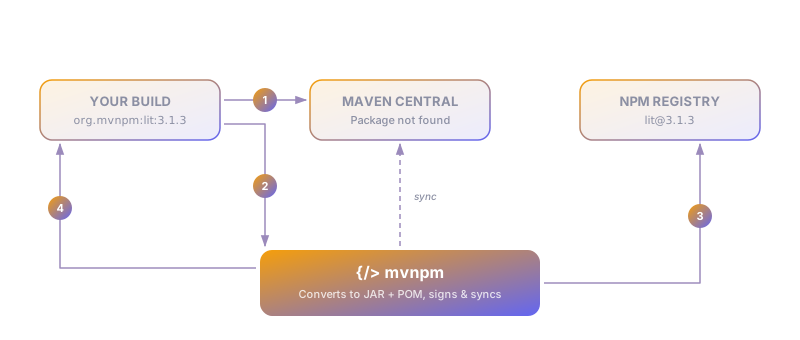
- Your build requests a package from Maven Central.
- If it's not there yet, the request falls through to the mvnpm repository.
- mvnpm fetches the package from NPM and converts it into a Maven artifact (JAR + POM).
- The artifact is returned to your build immediately and synced to Maven Central in the background.
Configuring the fallback repository
Add mvnpm as a fallback repository so missing packages are fetched automatically.
Maven
Add to your ~/.m2/settings.xml:
<settings>
    <profiles>
        <profile>
            <id>mvnpm-repo</id>
            <repositories>
                <repository>
                    <id>central</id>
                    <name>central</name>
                    <url>https://repo.maven.apache.org/maven2</url>
                </repository>
                <repository>
                    <snapshots>
                        <enabled>false</enabled>
                    </snapshots>
                    <id>mvnpm.org</id>
                    <name>mvnpm</name>
                    <url>https://repo.mvnpm.org/maven2</url>
                </repository>
            </repositories>
        </profile>
    </profiles>

    <activeProfiles>
        <activeProfile>mvnpm-repo</activeProfile>
    </activeProfiles>
</settings>
Gradle
Add to your build.gradle:
repositories {
    mavenCentral()
    maven { url "https://repo.mvnpm.org/maven2" }
}
Locking dependencies
Maven
The mvnpm locker Maven Plugin locks your org.mvnpm and org.webjars dependency versions, similar to package-lock.json or yarn.lock.
Gradle
Enable native dependency locking in your build.gradle:
dependencyLocking {
    lockAllConfigurations()
}
Then run gradle dependencies --write-locks to generate the lockfile.